


CareCam Pro
4.41.03K Reviews
App Specs
- Version
- 2.9.36
- Updated On
- License
- Free
- Downloads
- 1,000,000+
- Developer
- Care Home
- Categories
- Tools
- Platform
- Android
Screenshots
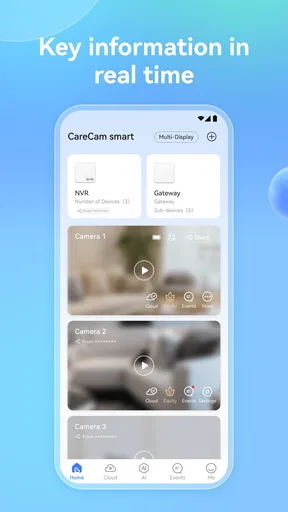
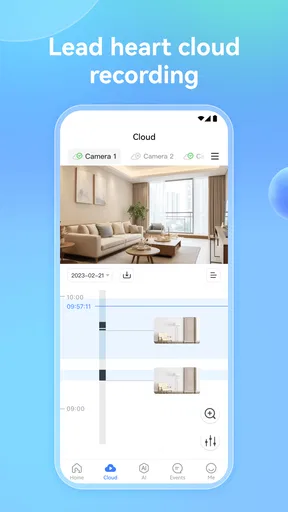
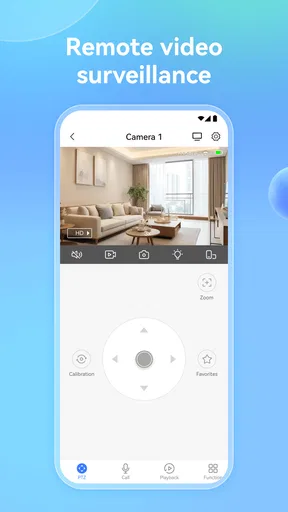
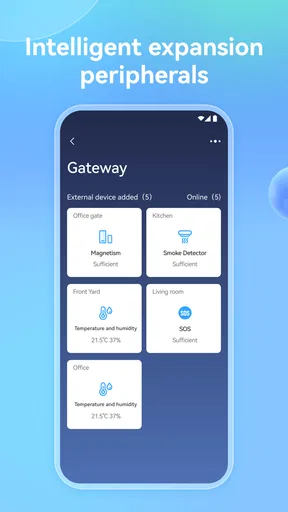
 Analysis by AppCompare
CareCam Pro is the kind of home-security tool I would consider when I want a straightforward way to keep an eye on a home, rather than build an elaborate smart-home system. After using it as a practical monitoring app, my overall impression is clear: it is most useful when you already have compatible Care Home equipment and want a phone-based control point that stays focused on security. It is less convincing as a universal solution for someone who expects one app to manage cameras, alarms, locks, lighting, and every other connected device under one roof.
The app is free to install and is listed for everyone, which makes trying it relatively easy. Care Home has kept it in the tools category, and that is a better description than calling it entertainment or lifestyle software. Its job is functional: help users check what is happening at home and interact with the security setup from a mobile device. The store summary presents it as a home-security system, but I found the more useful way to think about it is as the everyday companion to a CareCam-based setup.
My short verdict is that CareCam Pro works best when convenience matters more than a long list of advanced controls. It can make routine checking less awkward, especially for people who want to look in on a property while away. However, anyone comparing it with a mature, multi-brand security platform should examine compatibility and the exact hardware workflow before relying on it as the center of a larger system.
What using CareCam Pro feels like in everyday life
I find CareCam Pro most useful when a home check can be brief and routine, rather than something that needs constant attention. Before relying on it, I’d make one small test part of an ordinary day: check the setup while away from home, then confirm everyone who may use it knows what to do if something seems unusual. That practical baseline makes it easier to judge whether the app fits your household.
A focused approach to home monitoring
The first thing I noticed is how naturally the app fits a simple security routine. Instead of treating home monitoring as a technical project, I approached it as a series of small habits: checking the home before leaving, looking in after receiving an unexpected notification, and confirming that everything appears normal before going to bed. That narrow focus is one of its strengths. I did not feel pushed toward unrelated functions or a crowded dashboard.
This matters because a security app is often opened at inconvenient moments. I may be standing outside the front door, sitting in a car, or trying to check on a room while handling something else. A tool that makes the basic action easy is more valuable than one with dozens of impressive options that take too long to reach. CareCam Pro is appealing in that respect because its purpose is immediately understandable: use the phone as a convenient window into the home-security arrangement.
The developer, Care Home, has positioned the app as a practical tool rather than a specialist product for installers. That makes the experience approachable for ordinary households, but it also means experienced users may look for deeper configuration controls than the app is designed to emphasize. I see this as a deliberate trade-off rather than an automatic flaw.
Worth Reading Before You Choose

EA SPORTS FC Mobile 26 Is a Bigger Football Game, but It Takes Time

Flipboard Shows What News Apps Must Do Beyond the Feed

Switching to Android Auto Means Rethinking Your Driving Routine

Google Calendar Makes a Crowded Week Easier to Manage

Ludo King Makes the Most of the Minutes Between Plans

Baby Panda World Brings Quick Play to Modern Phones, but Its Game Library Feels Busy
A realistic scenario: checking the house during a busy day
Imagine leaving home in a hurry and later wondering whether the front area is quiet. With CareCam Pro, the useful workflow is not complicated: open the app, check the relevant view or security status available through the connected setup, and decide whether any further action is needed. If everything looks normal, the task is finished in moments. That small reduction in uncertainty is where the app earns its place.
A similar situation comes up when a family member is away for a few days. One person can use the app as part of a regular check-in routine instead of asking someone to visit the property immediately. I would still treat this as an aid to awareness, not a substitute for a trusted person, an alarm response plan, or professional monitoring where those are required. The app can help me see and react, but it does not remove the need for sensible home-security habits.
There is also a useful distinction between occasional checking and constant supervision. For occasional checking, a focused mobile app can be perfectly adequate. Constant supervision is a different expectation. It depends on the connected hardware, network reliability, phone settings, and how quickly a user can respond. I would not judge the app in isolation when the real experience depends on that entire chain.
Small habits that make the app more useful
One practical tip is to decide in advance what a normal check looks like. For example, I would choose a few moments in the day when I actually need to inspect the home, rather than repeatedly opening the app without a purpose. This keeps the tool from becoming a source of anxiety and makes unusual activity easier to notice. A predictable routine also exposes connection problems before there is an urgent reason to use the app.
Another useful habit is to separate “I want to look” from “I need to respond.” A quick visual check may be enough for a routine question, while an unexpected event deserves a more careful review of the surrounding circumstances. I would avoid making a serious decision from a single glance at a mobile screen. Lighting, camera position, and the limited context of a remote view can all affect what appears to be happening.
For households with several people, it is worth agreeing on who is responsible for checking the app and what each person should do if something looks wrong. This is not a special feature of CareCam Pro, but it is an important way to avoid a common weakness in shared security setups: everyone assumes someone else has seen the alert. The app is more effective when it sits inside a clear household routine.
Compatibility should be the first question
The biggest practical question is not whether the app sounds useful; it is whether it matches the equipment already installed or the equipment you plan to buy. A security app can be polished and still be the wrong choice if your cameras or other devices belong to another ecosystem. I would check the hardware relationship before changing an existing setup, because replacing equipment can cost far more time and money than installing another app.
This is also where CareCam Pro differs from general smart-home alternatives. A broad platform may support devices from multiple manufacturers, while a more focused companion app can offer a simpler experience within its own product family. The focused route is attractive if you prefer fewer moving parts. The broader route is usually better if you are assembling a mixed system over time.
I would also think about who will use the app. If one technically confident person manages everything, a narrower ecosystem may be fine. If several relatives need access, the setup should be judged by the least comfortable user. An app that feels obvious to one person may still create confusion for another, especially when remote access is needed quickly.
Where the app has a genuine advantage
CareCam Pro’s strongest quality is concentration. It does not need to compete with a full smart-home dashboard to be useful. For someone who wants a dedicated place to interact with a compatible home-security arrangement, that focus can reduce mental clutter. I would rather open one clearly purposed tool than search through a general home-control app when I am trying to check on security.
The app also benefits from being available on older Android devices. Its minimum requirement is Android seven or later, so people who keep a dependable older phone may have a better chance of using it without immediately upgrading. That does not guarantee identical performance on every device, but it makes the app more accessible than products that require a recent operating system.
Its popularity provides some reassurance that it is not an obscure experiment. CareCam Pro has passed one million installs and holds an average rating of 4.4 from around thirty-three thousand ratings. I do not treat those figures as proof that it will suit every household, but they suggest that many people have found a reason to keep using it. The number of written reviews is around one thousand, which gives prospective users some user feedback to examine alongside their own hardware needs.
The meaningful weakness: the app cannot be judged apart from the setup
The main limitation is that the phone application is only one part of a security system. A smooth interface cannot compensate for poor camera placement, an unreliable home connection, a phone that blocks background activity, or a household that has not agreed on how to respond to alerts. This makes the experience less predictable than using a self-contained utility. Two people can install the same app and have very different results because their equipment and routines differ.
That dependence can also make troubleshooting frustrating. When something does not work as expected, the cause may be the app, the connected device, the network, account access, or the phone itself. A user who wants a single, transparent explanation for every problem may find this ecosystem harder to diagnose. I would be prepared to spend a little time testing the complete setup before trusting it for an important property.
There is another trade-off around expectations. The phrase “home security” can make people imagine a complete protective service, but a mobile app should not be treated as a guarantee that a home is safe. It can support observation and response, yet it does not replace physical locks, sensible lighting, careful sharing of access, or an emergency plan. I consider this an important limitation because overconfidence is more dangerous than a missing convenience feature.
Costs, updates, and the practical ownership picture
CareCam Pro is free to download, which lowers the barrier to testing it with compatible equipment. The app also includes in-app purchases ranging from $0.99 to $299.99 per item. That wide range makes it especially important to understand what a purchase relates to before confirming it. I would review the purchase screen carefully and avoid assuming that every useful function is included in the free installation.
The current version is 2.9.36, and the app was first released on July 3, 2020. Those details suggest a product with an established history rather than a brand-new arrival. For me, the more important point is to keep the app updated when possible and to test the basic workflow after a major change. Security tools should not be left untested for months just because they appeared to work once.
I would also give the app a trial period before using it for a holiday home, an elderly relative’s property, or any place where a missed event would matter greatly. During that trial, I would check how quickly I can reach the relevant screen, whether the household understands the routine, and whether the connected devices remain dependable at different times of day. This kind of rehearsal reveals more than an installation alone.
Who should choose it, and who should look elsewhere?
CareCam Pro is a good fit for people who already use compatible Care Home equipment and want a direct mobile companion. It is also suitable for households that value a focused security tool over a broad smart-home platform. If your main goal is occasional remote checking and you prefer not to manage a complicated collection of services, I can see the appeal.
It may also suit someone using an older Android phone, since Android seven is enough to meet the stated minimum requirement. That is helpful for a spare device kept at home or for a family member who does not replace phones frequently. I would still test the app on the actual phone rather than assuming an operating-system requirement tells the whole performance story.
I would be more cautious if you are starting from scratch and want maximum flexibility across brands. A larger platform may be a better long-term choice if you expect to add smart locks, sensors, lights, speakers, or equipment from several manufacturers. Likewise, users who need detailed professional controls, formal monitoring arrangements, or a highly documented response process should compare specialist alternatives rather than choosing only because the app is free.
People who dislike recurring digital maintenance may also want to think twice. Security apps require attention: access must remain available, devices must stay connected, and the household must remember what to do when something changes. If you are unlikely to check the setup periodically, no companion app will make the system truly dependable.
How it compares with ordinary alternatives
The usual alternative is a manufacturer-neutral smart-home platform. That route can be more convenient for a home filled with mixed-brand devices, because it may bring several categories into one place. The cost is often greater complexity. More integrations can mean more settings, more account relationships, and more opportunities for one component to behave differently after an update.
Another alternative is using the individual apps supplied by each camera or alarm manufacturer. Compared with that approach, a focused Care Home companion can feel more coherent when the household’s equipment belongs to the same family. The disadvantage is reduced freedom if your needs change later. I would choose the focused approach when simplicity today matters more than expansion tomorrow.
There is also the option of relying on a browser or a desktop interface for remote checks. I find a phone app more practical for quick, unplanned moments, while a larger screen can be preferable for extended review. CareCam Pro makes more sense as an everyday mobile tool than as my only method for detailed investigation. That distinction helps set realistic expectations about what the app should do.
My final assessment
After weighing the convenience against the dependency on compatible hardware and a reliable overall setup, I see CareCam Pro as a sensible focused tool rather than a complete answer to every home-security need. Its free entry point, accessible Android requirement, established user base, and clear purpose make it easy to consider. The strongest case is a household that already fits the Care Home ecosystem and wants quick checks without the distraction of a general smart-home control center.
I would recommend it to a friend who wants a simple security companion and is willing to test the complete arrangement before relying on it. I would not recommend choosing it blindly as the foundation of a mixed-brand system, nor would I treat the app alone as professional protection. The right decision depends on the equipment, the people using it, and the seriousness of the situation being monitored.
In the end, CareCam Pro succeeds when it stays in its lane: a convenient mobile interface for a compatible home-security setup. It is not the most obvious choice for users demanding unlimited expansion or specialist controls, but it can be a practical everyday option for families that value a direct, uncomplicated way to stay aware of what is happening at home.
Pros
- Remote live viewing with smooth video on compatible connections.
- Motion alerts help you react quickly to activity at home.
- Supports two-way audio for communicating through the camera.
- Cloud and local recording options add flexibility for video storage.
- Simple setup process makes it approachable for first-time users.
Cons
- Some features may require a paid cloud subscription.
- Video quality and playback can depend heavily on network strength.
- Notifications may occasionally arrive late or trigger false alarms.
- Privacy depends on securing your account and connected cameras.
- Compatibility may vary across camera models and mobile devices.
FAQs for CareCam Pro
What is CareCam Pro and what can I use it for?
CareCam Pro is a mobile companion app designed to connect with compatible security cameras and monitoring devices. After pairing supported hardware, you can generally use it to view live video, check activity remotely, receive alerts, and review recorded footage. Its exact tools depend on the camera model, firmware, subscription plan, and permissions enabled on your Android or iOS device.
How do I connect CareCam Pro to my security camera?
To connect CareCam Pro, install the app from the official store, create or sign in to an account if required, and follow the in-app setup instructions. Most compatible cameras need a stable Wi-Fi connection and may require scanning a QR code or entering a device ID. Keep your phone, camera, and router nearby during setup, and confirm that the selected camera model is supported.
Does CareCam Pro require a subscription or additional hardware?
CareCam Pro normally works with compatible CareCam security hardware, so downloading the app alone may not provide useful monitoring features. Some functions, such as cloud storage, longer video history, advanced alerts, or access for multiple users, may depend on a paid service or the camera package you own. Check the app listing and your device documentation for current pricing and limitations.
Can I watch my camera remotely and receive notifications?
Remote viewing and motion or activity notifications are among the main reasons users install CareCam Pro, but performance depends on your camera being online and your phone having internet access. You must allow notifications and, in some cases, background activity and location-related permissions. Delays can occur because of weak Wi-Fi, server problems, power interruptions, or incorrect alert settings.
Is CareCam Pro safe to use, and what permissions does it need?
CareCam Pro may request access to your camera, microphone, local network, notifications, photos, or storage, depending on the features and device you use. These permissions support video viewing, two-way audio, setup, and saving recordings. Before using the app, review its privacy policy, install updates from official sources, choose a strong unique password, and enable account security options whenever available.


